Open source·Linux, macOS, Windows

The Cursor experience,
on your own Claude Code

Kursor is an open-source, Cursor-style AI editor built on VS Code (VSCodium). Agent chat, Ctrl+K inline edits and Tab completions, all powered by the Claude Code CLI already installed and signed in on your machine. No new account, no API keys, no middleman.

MIT licensed. Usage runs on your own Claude plan. Not affiliated with Anthropic or Anysphere (Cursor).

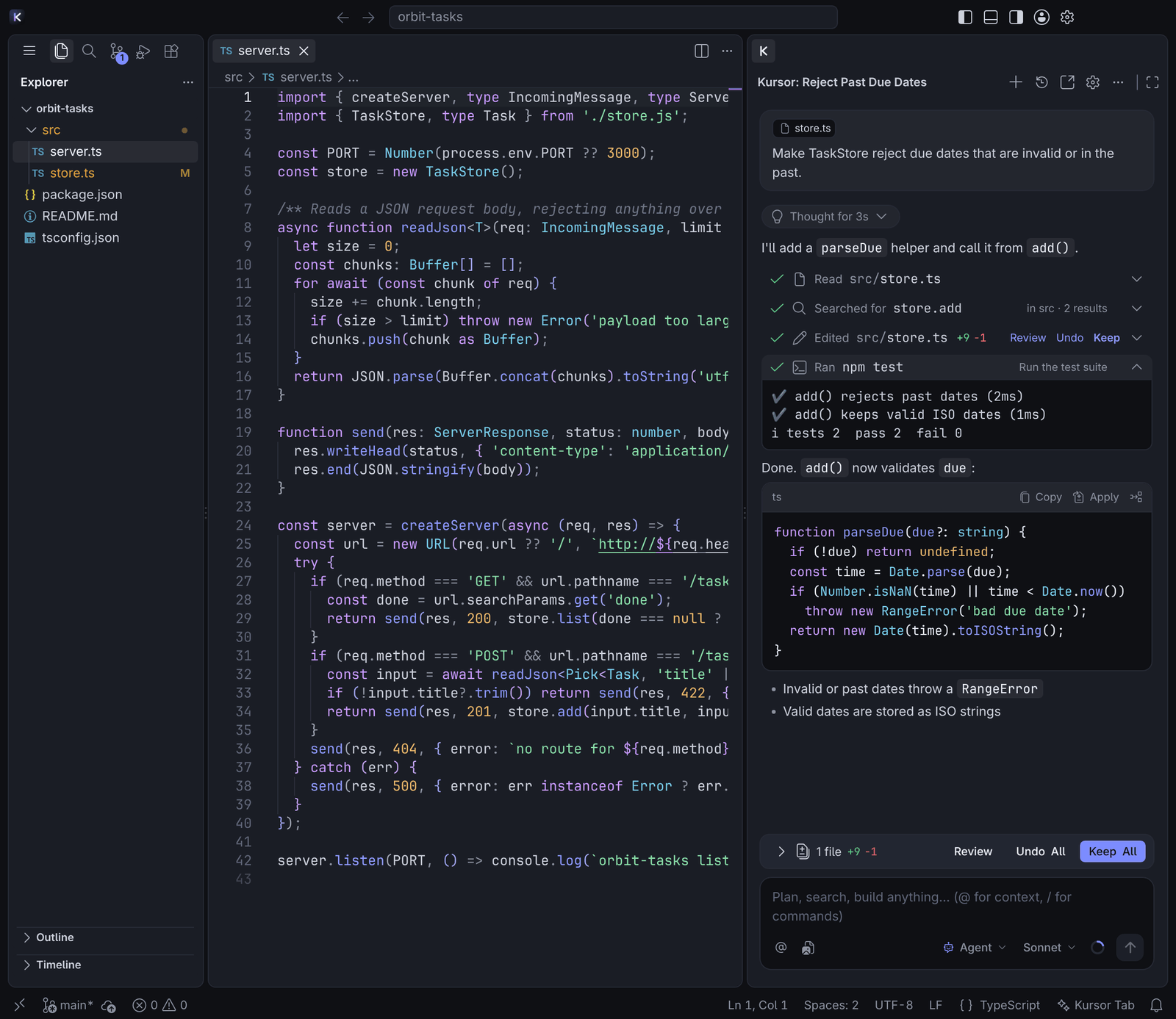
Kursor: editor with the agent chat in the right side bar showing Read, Search, Edit and Run tool rows, an edited file with Review / Undo / Keep, test output and the review bar
Your own Claude CodeRuns the claude you installed, unmodified
No API keysUses your existing Claude login and plan
No telemetryThe extension has no server and no analytics
MIT licensedVSCodium and Open VSX underneath

Features

Everything you reach for in Cursor

The same muscle memory, the same panes, the same review flow. Kursor's extension reimplements the Cursor UI on top of the Claude Code agent loop.

Inline edits that stay in your editor

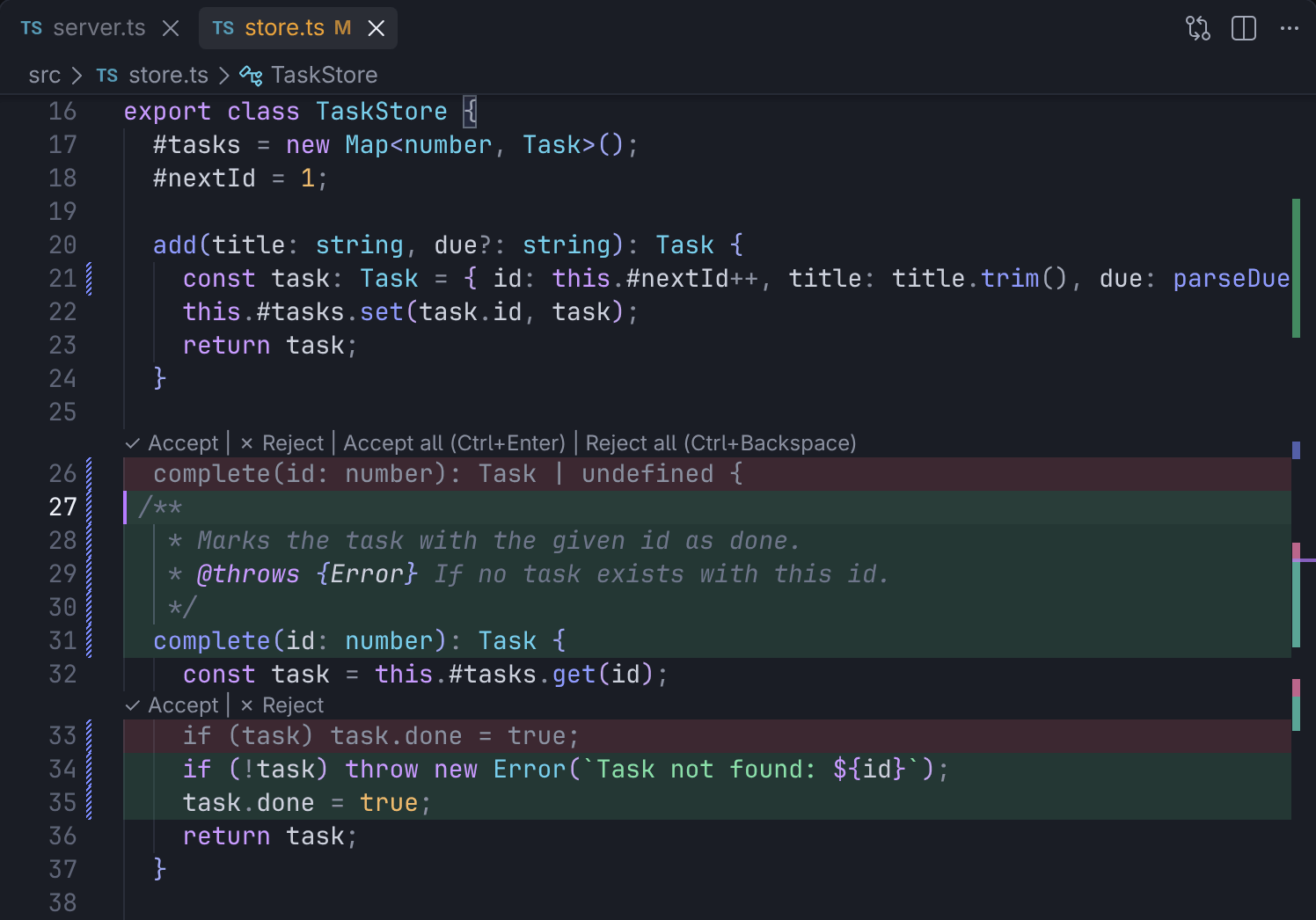
Select code, press Ctrl+K, type what you want. The result is rendered as an in-place vertical diff: removed lines in red, new lines in green, with Accept and Reject lenses on every block. Nothing is written until you accept, and Ctrl+Z rejects everything. Quick question, whole-file edit and send-to-chat work from the same prompt.

  • CtrlK edit
  • CtrlEnter accept
  • Ctrl⌫ reject
Ctrl+K inline edit: removed lines in red and new lines in green, including a JSDoc block, with Accept and Reject lenses on each block

Approve commands, review edits

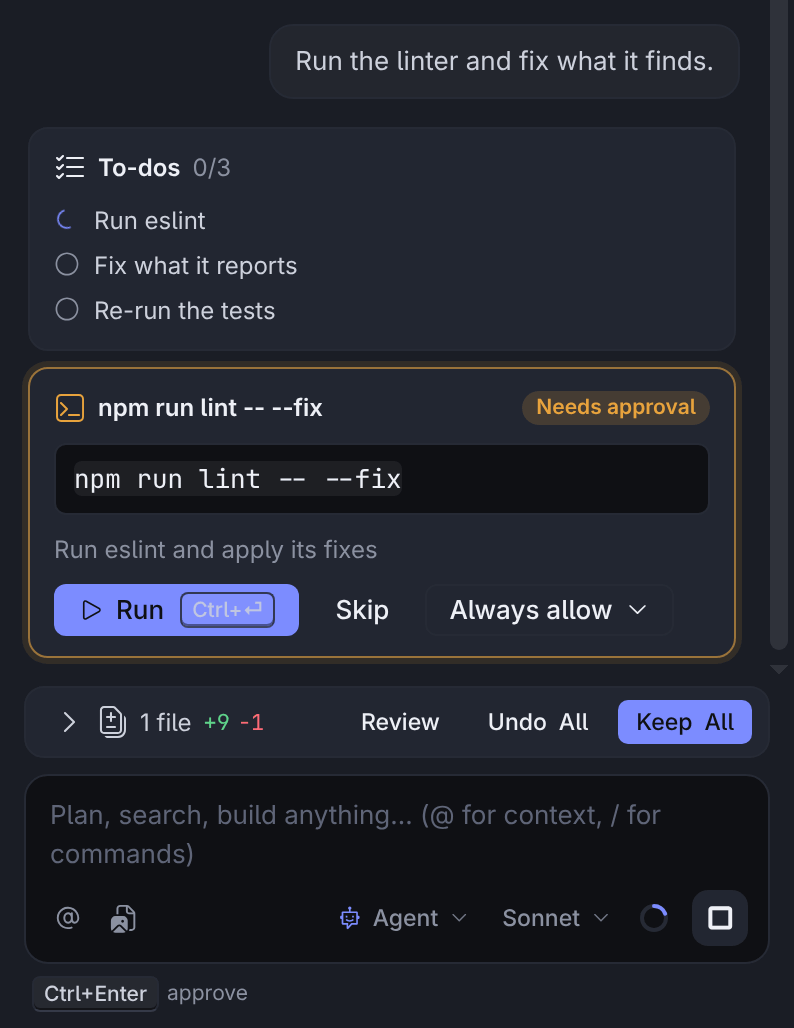
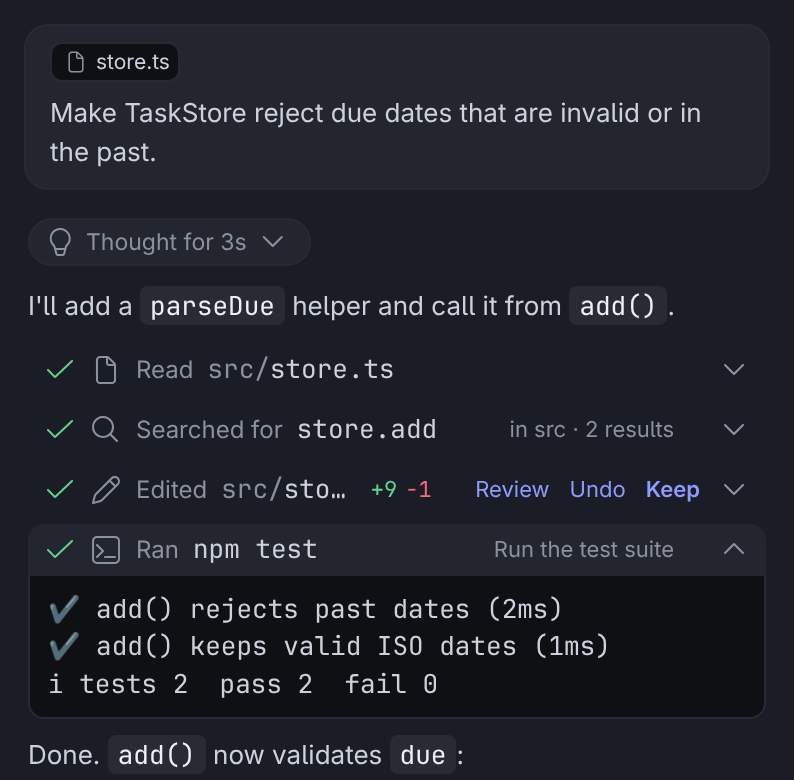
When the agent wants to run something that isn't read-only, you get a card with the exact command, a one-line explanation and Run / Skip / Always allow. File edits show up as rows with +/− counts and Review, Undo and Keep, per file and per hunk; a review bar tracks the whole turn, and checkpoints restore files to the state before any message. Plan mode shows a plan with Build / Reject.

  • CtrlEnter keep all
  • Ctrl⇧⌫ undo all
Permission card for npm run lint -- --fix with Run, Skip and Always allow, above the review bar and the composer
Chat transcript with Read and Search rows, an Edited row showing +9 −1 with Review, Undo and Keep, and the test run output

Agent chat

Agent, Ask and Plan modes in the secondary side bar. Streaming replies, tool rows for Read / Search / Run / Edit, @-mentions for files, folders, problems, terminal and git, slash commands, image attachments.

  • CtrlI toggle
  • CtrlL add selection

Tab completions

Ghost-text completions from a fast model, debounced so they stay cheap. Toggle, snooze or disable per language from the status bar.

  • Tab accept
  • Alt\ trigger

Terminal and commits

Ctrl+K in the terminal turns a sentence into a command (Run / Insert / Edit). The sparkle in Source Control writes a commit message from your staged diff.

Rules

Reads .cursor/rules/*.mdc (always, auto-attached, agent-requested, manual), .cursorrules, AGENTS.md and your User Rules; CLAUDE.md keeps working through Claude Code itself.

Fix in Chat

Lightbulb actions on diagnostics and selections: Fix in Chat, Add to Chat, Explain, Edit with Kursor. Terminal context menu: add selection, debug last command.

Omarchy-native on Linux

Follows your Omarchy theme automatically, registers in the launcher, optional SUPER+⇧+K binding and default-editor hookup. Plain Linux, macOS and Windows get the native integration too.

How it works

Two pieces, and your own Claude Code

Kursor is a rebranded VSCodium build and a VS Code extension. The extension never talks to Anthropic directly.

  1. 01

    Your Claude Code

    Kursor finds the claude binary you already installed (mise, npm, Homebrew, the native installer) and spawns it unmodified with the Claude Agent SDK's streaming protocol. It signs in with its login; Kursor never reads, stores or forwards credentials.

  2. 02

    The editor

    A stock VSCodium release, renamed to Kursor with its own icon, data folders and kursor:// scheme. Open VSX for extensions. The Kursor extension adds the chat pane, inline edits, completions and the Cursor keymap.

  3. 03

    Your machine, your plan

    Every chat turn, inline edit and completion is a Claude Code call under your own Pro, Max, Team or Console account, at normal Claude Code rates. Nothing leaves your machine except what Claude Code itself sends.

Trademark and terms. Kursor is an independent open-source project. It is not affiliated with, endorsed by, or built by Anthropic or Anysphere. "Claude" and "Claude Code" are trademarks of Anthropic; "Cursor" is a trademark of Anysphere. Kursor runs the unmodified Claude Code binary that you install and sign into yourself; your use of Claude Code is governed by Anthropic's terms.

Install

Three platforms, one installer

Download the bundle for your platform from the latest release, or build from source. The installer needs no root or admin rights.

  • The Claude Code CLI, installed and signed in (claude auth login)
  • Node.js 18+ to run the installer (not needed afterwards)

Re-running the installer upgrades in place and never overwrites your settings. uninstall.sh / uninstall.cmd remove everything (--purge also deletes settings).

# from a release bundle (Kursor-linux-x64-<version>.tar.gz)
tar -xzf Kursor-linux-x64-*.tar.gz && cd Kursor-linux-x64-*/
bash install.sh  # add --hypr-bind --default-editor on Omarchy

# or from source
git clone https://github.com/brucegrootgames/kursor.git && cd kursor
npm install && npm run package && bash product/install.sh
  1. Installs to ~/.local/opt/kursor, command kursor, a launcher entry and icons. No root.
  2. On Omarchy it also installs a theme hook so Kursor follows omarchy theme set.
  3. Launch with kursor or from your app launcher.

Shortcuts

Cursor's keymap, unchanged

Cursor's defaults. On macOS replace Ctrl with ⌘. VS Code's Ctrl+K chords move to Ctrl+R, as in Cursor.

Editor

Inline edit prompt
CtrlK
Accept / reject the inline edit
CtrlEnter/Ctrl⌫
Accept / reject one block
CtrlAltY/N
Accept · trigger a completion
Tab·Alt\
New chat with the current selection
CtrlL
Add selection to the current chat
Ctrl⇧L

Terminal

Generate a command
CtrlK

Chat

Send · newline · send now
Enter·⇧Enter·CtrlEnter
Cycle mode (Agent / Ask / Plan) · model
Ctrl.·Ctrl/
Keep all / undo all agent edits
CtrlEnter/Ctrl⇧⌫
New chat · chat history
CtrlN·CtrlAlt'

Anywhere

Toggle the agent chat
CtrlI
Kursor Settings
Ctrl⇧J

"Send now" skips the queue while the agent is still working.

FAQ

Questions, answered

Do I need an Anthropic API key?

No. Kursor uses the Claude Code CLI on your machine, signed in with your own Claude account (Pro, Max, Team or Enterprise) or Console key. Sign in once with claude auth login.

What does it cost?

Kursor is free and MIT licensed. Chat turns, inline edits and Tab completions are regular Claude Code requests under your plan. Tab completions use a fast model and are debounced; turn them off from the status bar if you'd rather not spend quota on them.

Does Kursor send my code anywhere?

Only to Claude Code, which sends it to Anthropic as any Claude Code session would. The extension has no server, no telemetry and no analytics. Workspaces in Restricted Mode are never read until you trust them.

Can I keep using my VS Code extensions?

Yes. Kursor is VSCodium with the Open VSX gallery, so most extensions install normally. Your existing VS Code settings are not touched; Kursor keeps its own profile.

Is Tab as good as Cursor's?

Not yet. Cursor trains a dedicated model for next-edit prediction; Kursor asks a general fast model for a short continuation, with a ~1 s pause and a ~2.5 s round trip. It is useful for boilerplate, not for keystroke-level prediction.

How do updates work?

Every release ships bundles for all platforms. Download the new one and run its installer, or git pull and re-run product/install.sh / install.cmd: the app directory is replaced, your settings and chats stay.

Brand

A cursor and a bracket

A text cursor and a code bracket make the K. The cursor is the only thing that carries colour. Assets are free to use when referring to Kursor; the full guide is in docs/BRAND.md.

Kursor mark on its tile
Mark · tileApp icon, favicon, avatarsSVGPNG 512
GlyphAny dark surfaceSVG
MonoAny single colourSVG
Kursor wordmark
WordmarkHeaders, docs, socialSVGSocial card
Ink#0F1014
Page and app background
Surface#1A1D25
Cards, panels, inputs
Border#262A35
Hairlines
Mist#EEF0F6
Primary text, the bracket
Muted#8B91A1
Secondary text
Violet#7C8CFF
Focus, links, buttons
Orchid#B57CFF
Gradient end, editor cursor
Keep#5FD38A
Accepted, added
Undo#FF6B78
Rejected, removed
Warn#E8A33D
Needs approval

Inter 700, −2%

UI and website. Headlines 700 with −0.02 em tracking, body 400 / 500.

Accent gradient: the headline highlight, the primary action and the cursor bar only.

const k = 1;

Code uses your editor font (JetBrains Mono by default on Omarchy). Please don't recolour the bracket, add shadows, or place the mark on the violet gradient.

Your editor, your Claude Code

Free and open source for Linux, macOS and Windows. Bring the Claude Code CLI you already use.